
Technical Support

Working with the Information Management & Technology Services of University of Wollongong, the Technical Support Centre (TSC) is an administrative unit responsible for providing Information Technology services and support to all staff and students of UOW College Hong Kong. Our mission is:

  • to create and maintain an IT environment for the pursuit of academic excellence and quality management;
  • to ensure effective use of computing resources;
  • to provide quality professional services to students, staff and administration;
  • to promote and assist the use of new computing technology for facilitating College IT development; and
  • to assist administrative units in process reviews, and proposing and developing IT solutions where appropriate.
Hong Kong

Australia

  • IT Service Portal: Log help tickets, use live support chat and search for answers online in our Knowledge Base at .
  • User account and password help: https://uow.info/password

The College adopts the following relevant policies on IT services shared with the University of Wollongong.


The College has equipped the following facilities in our campus.

  • Major cloud based software for student’s service and a server room with off-site data backup and recovery for administrative service;
  • Over 130 IP phones;
  • 7 computer laboratories with over 300 computers, one of them are Mac laboratories.
  • Teaching facilities include LCD projector, visualizer, AV equipment in all lecture theatres and classrooms; and
  • 4 network printers for students.

Computing Facilities

The College rents four computer laboratories of 300 sets. The hardware setup are Intel Core i5-6600 (4 Cores/6MB/8GT/3.3GHz to 3.9GHz/65W); Windows 10.

Classroom Facilities

All classrooms are mainly equipped with high performance computer, Windows 10, 64bit OS, Intel(R) Core™ i7-2600 CPU @ 3.40GHz 3.39Ghz, 8GB RAM with the following common software together with virus scan software to ensure a robust learning platform.

  • Windows 11
  • Microsoft Office 2021 or above

The Projector models range from EPSON EMP-821, EPSON EMP-822, EPSON EMP-810 to SANYO PLC-XT25

Software in Computer Laboratories

The following shows the some of the software list in the computer laboratories.

  • Adobe Creative Cloud (including Illustrator, InDesign, Photoshop, Lightroom , Lightroom Classic, Premiere Pro, After Effects, Audition, Final Cut Pro, Dreamweaver) for Mac
  • Adobe Creative Cloud (including Illustrator, InDesign, Photoshop, Lightroom , Lightroom Classic, Premiere Pro, After Effects, Audition, Final Cut Pro, Dreamweaver) for PC
  • Adobe Creative Cloud for enterprise All Apps and Autodesk Maya for Mac
  • ArcGIS
  • Eclipse IDE for Java Developers - Mars packages
  • Excel + Add-in: Solver
  • Flight Sim
  • Infinity Digital Language software
  • Microsoft Access 2021 or above
  • MS Office 2021 or above
  • MYOB
  • Simul8
  • Sniffy
  • SPSS v27
  • VirtualBox
  • VirtualBox Extension Pack

The College provides the following services

  • On-campus Wi-Fi services
  • Office 365 email services
  • E-Learning Management System, Moodle
  • Time Tabling system, Syllabus Plus
  • Admission System, College Program Management System
  • Staff Intranet
  • Student Record Management System, UOW SOS and Ellucian Banner
  • Financial Management System, NetSuite
  • Human Resource Management System, Chris21

The College shares the use of E-Learning management system portal, namely, Moodle, developed and maintained by the University of Wollongong with the following features.

  • Course materials upload/download;
  • Create a link to a URL to support teacher for linking course related material elsewhere for student access;
  • Enable tracking: It allows both staff and students to monitor progress through learning materials and course completion. Reports can be generated on individuals on completion of activities and resources. Completion tracking can further be used in conjunction with restricted access settings for security reason. Access to activities can be set to be dependent upon viewing or completion of a previous activity;
  • Enable teachers to communicate with students, collect work, provide grades and feedback;
  • Enable Web conference between students and teachers. It also allows real-time collaboration, recording tools, breakout rooms, password protected sessions, participation and progress tracking tools;
  • Forums whereby students and teachers can exchange ideas by posting comments. The product supports forum where posts can be graded by the teacher or peers;
  • Group selection which allows users to auto-enrol in groups. It also supports online group work for assessment;
  • Assessment such as Quiz function. It enables teachers to create quizzes comprising various types of questions, including multiple choice, matching, short-answer and numerical; and
  • Book module is used to create multi-page resources with a book-like format. It can be accessed allowing multiple resources to be laid out in a linear format featuring chapters and sub-chapters.

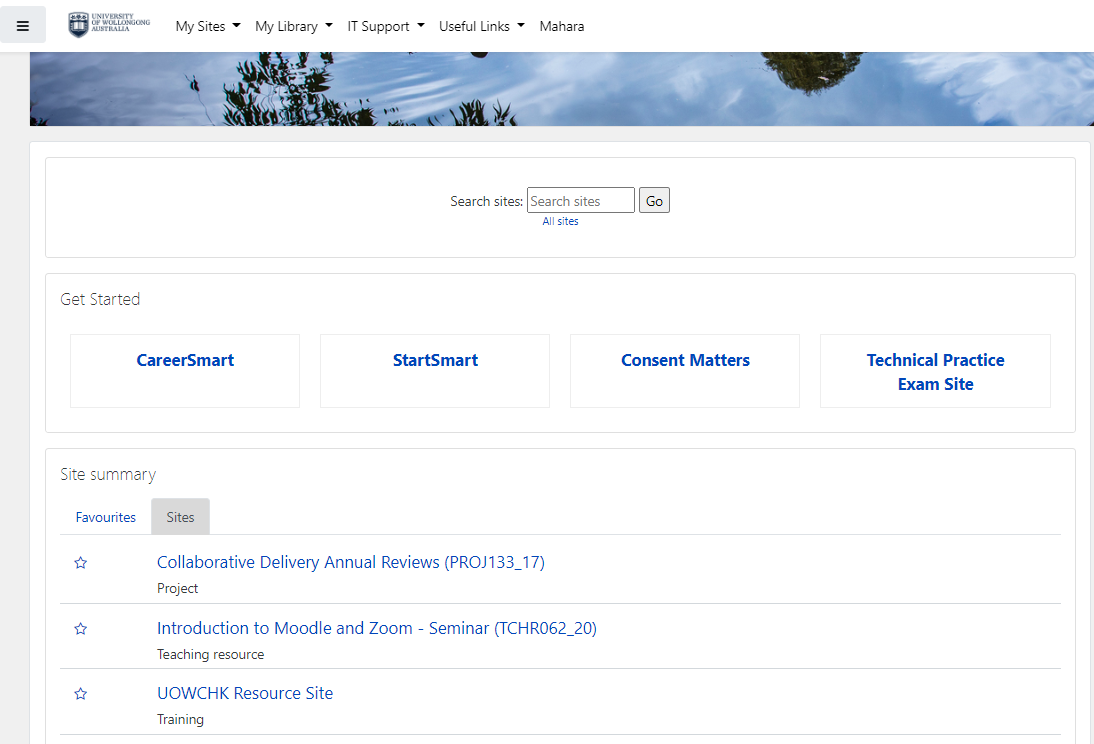
The figure below shows the cover page of Moodle being used by UOW after login with site summary and support services.


The College uses the timetabling software called Syllabus Plus developed by Scientia. It is for resource scheduling, class scheduling, exam scheduling and space management. The product has been used by UOW for class and examination schedules for over 10 years. It offers the highest level of flexibility, including fully automated scheduling, manual scheduling and a combination of the two. The system integrated with the College’s Student Records Management system to optimize efficiency by reducing the time spent manually inputting information. The system further:

  • improves student engagement by creating personalised timetables for students and staff;
  • gains visibility of information by viewing timetables at Faculty level and the College master timetable;
  • prevents clashes by creating a clash-free coherent timetable using the resources available; and
  • supports dynamic scheduling for minor adjustments and generating alternative solutions.


Exam Scheduling


Examination planning at the College is a time intensive process involving many stakeholders. Syllabus Plus provides graphical scheduling tool to accommodate diverse interests and allows users to develop a timetable that meets College needs. Some of the major features are:


  • Large numbers of exams can be scheduled at the same time;
  • An improved student experience by spreading examinations for the whole examination period.
  • Enable multiple users to collaborate on data entry, validation, scheduling revisions and post scheduling tasks including the assignment of invigilators.


Student Online Service (SOS)

There are two systems adopted by the College. For UOW’s top-up prorgammes, the College adopted the Student Online Service developed by UOW and is the most vital tool in the management of students’ enrolment at UOW. It is essential that students are advised to access SOLS at least once per week so that they do not miss out on important information. It is the portal where students must go to enrol and withdraw, check their results, receive important messages, view fees information, change personal details and a range of other services. SOLS provides the following eight menus.

  • The Basics
  • Current Session Menu
  • Enrolment Menu
  • Timetable Menu
  • Fees Menu
  • Personal Details & Consent Menu
  • Graduation Menu
  • SOLS Vote and Comments
  • Academic Consideration


The Basics is just to familiarise students about the processes. When students open certain menu items, they will see this button at the top of the page. To avoid delays in processing the requests, they are advised to read instructions and important information about the process before they start.


Ellucian Banner

For Diploma, Associate Degree and Degree programmes, the College adopted Ellucian Banner, student record management system. The system is equipped with a robust set of features like attendance tracking, academic performance management, fee management, staff and student portal, etc. These tools help in managing the College efficiently and accurately to save time and maintain accuracy.

Guidelines for Generative AI Utilization

Welcome to our website dedicated to helping freshmen adopt generative AI! Our goal is to provide you with the knowledge, resources, and tools you need to get started with this exciting field.

Generative AI is a rapidly growing area of artificial intelligence that focuses on creating new content, such as images, text, and music, using machine learning algorithms. It has the potential to revolutionize many industries, from art and entertainment to healthcare and transportation.

On our website, you’ll find an overview of what generative AI is and its applications, a guide for getting started, tips and tricks for prompt engineering, a collection of learning resources, and a showcase of tools and software that can be used for working with generative AI.

We hope that our website will be a valuable resource for you as you begin your journey with generative AI. If you have any questions or feedback, please don’t hesitate to contact us. We’re here to help!

 Generative AI Tools: Focus on text/code generation with context awareness

Tool Name

Website

Key Features

Official Documentation

ChatGPT (OpenAI)

https://chat.openai.com/

Conversational AI, code generation, multi-language support, plugin integrations

https://platform.openai.com/docs/ (API-focused, general docs in Help Center: https://help.openai.com/)

Claude (Anthropic)

https://claude.ai/

100K+ context window, document analysis, constitutional AI for safety

https://docs.anthropic.com/claude/docs (requires login for full access)

DeepSeek

https://deepseek.com/

128K context, free access, file upload support (PDF/Word/Excel)

https://platform.deepseek.com/docs/ (API-focused)

Gemini (Google)

https://gemini.google.com/

Multimodal (text+image), Google ecosystem integration, real-time web search

https://ai.google.dev/gemini-api/docs (API-focused, limited public docs for Gemini app)

Groq

https://groq.com/

Ultra-fast LLM responses (LPU inference engine), API access

https://console.groq.com/docs/ (API and usage guides)

Hugging Face Chat

https://huggingface.co/chat

Open-source models, community-driven AI, customizable assistants

https://huggingface.co/docs (covers models, APIs, and tools)

Mistral AI

https://mistral.ai/

Open-weight models, efficient multilingual processing

https://docs.mistral.ai/ (covers models, APIs, and deployment)

Monica

https://monica.im/

All-in-one AI assistant (chat, writing, translation)

Official Support Page:
https://support.microsoft.com/copilot

Enterprise Admin Guide:
 https://learn.microsoft.com/en-us/copilot/

Perplexity AI

https://www.perplexity.ai/

Cited answers with sources, real-time web search, topic discovery

https://docs.perplexity.ai/ (API and general usage)

Poe

https://poe.com/

Aggregates multiple AI models (GPT-4, Claude, etc.), bot creation

Not explicitly listed (Help Center: https://help.poe.com/)

YouChat

https://you.com/

Web-connected responses, citation generation, multimodal search

Not explicitly listed (Help Center: https://you.com/help)

土豆AI

https://www.aitodo.cc/

Chinese-focused AI assistant optimized for Mandarin/Cantonese, Multi-document processing and Data extraction & analysis from uploaded files

Help Centre

Paraphrasing Tools: Rewriting modes and language enhancement

Tool Name

Website

Key Features

Official Documentation

Paraphrase Online

https://www.paraphrase-online.com/

Simple interface, no login required, quick results

Not explicitly listed (basic instructions on website)

Paraphraser.io

https://www.paraphraser.io/

Multiple modes (fluency/creative/shorten), AI synonym suggestions

Not explicitly listed (usage guides on blog: https://www.paraphraser.io/blog)

Prepostseo

https://www.prepostseo.com/paraphrasing-tool

Free tier, multilingual support, plagiarism checker integration

Not explicitly listed (tool guides on website)

QuillBot

https://quillbot.com/

Synonym slider, grammar checker, summarizer, plagiarism detector

https://help.quillbot.com/ (Help Center, no formal docs)

Spinbot

https://spinbot.com/

Free paraphrasing, bulk text processing, basic grammar checks

Not explicitly listed (basic FAQ on website)

Wordtune

https://www.wordtune.com/

Sentence rewriting, tone adjustment (formal/casual), Chrome extension

https://support.wordtune.com/ (Help Center, guides for usage)

Proofreading & Plagiarism Tools: Grammar/style checks + plagiarism detection

Tool Name

 Website

Key Features

Official Documentation

Grammarly

https://www.grammarly.com/

Real-time grammar/spelling checks, tone detection, plagiarism detector (premium)

https://support.grammarly.com/ (Help Center, extensive guides)

LanguageTool

https://languagetool.org/

Open-source, supports 30+ languages, browser/office extensions

https://dev.languagetool.org/ (technical docs, user guides on website)

PaperRater

https://www.paperrater.com/

Free grammar check, vocabulary suggestions, automated scoring

Not explicitly listed (FAQ on website)

Quetext

https://www.quetext.com/

DeepSearch™ algorithm, color-coded plagiarism highlights

https://www.quetext.com/help (Help Center, usage guides)

Scribbr

https://www.scribbr.com/

Academic proofreading, plagiarism checker with citation support

https://www.scribbr.com/knowledge-base/ (guides, no formal docs)

WhiteSmoke

https://www.whitesmoke.com/

Multilingual proofreading, document templates

Not explicitly listed (basic guides on website)

Video & Graphics Generation Tools: AI-assisted creation and editing capabilities

Tool Name

Website

Key Features

Official Documentation

DALL·E (OpenAI)

https://openai.com/dall-e

Text-to-image with editing capabilities, outpainting

https://platform.openai.com/docs/guides/images (API-focused, part of OpenAI docs)

Descript

https://www.descript.com/

AI voice cloning, podcast/video editing via transcript

https://www.descript.com/help (Help Center, detailed guides)

HeyGen

https://www.heygen.com/

Avatar video creation, voice cloning, lip-sync automation

https://docs.heygen.com/ (API and usage guides)

Ideogram

https://ideogram.ai/

Text-to-image with reliable typography generation

Not explicitly listed (basic guides on website, blog: https://ideogram.ai/blog)

Kaiber

https://kaiber.ai/

Music video generation, style transfer for videos

Not explicitly listed

Leonardo.AI

https://leonardo.ai/

Fine-tuned models for game assets, texture generation

https://docs.leonardo.ai/ (API and usage guides)

Luma AI

https://lumalabs.ai/

3D model generation from images, NeRF rendering

https://docs.lumalabs.ai/ (API and tool guides)

MidJourney

https://www.midjourney.com/

Discord-based AI art generation, high-resolution stylized images

https://docs.midjourney.com/ (comprehensive usage guides)

Pika Labs

https://pika.art/

Text-to-video and image-to-video, 3D animation styles

https://pika.art/docs (basic guides, community-driven)

Runway ML

https://runwayml.com/

Video editing with AI (green screen, motion tracking), Gen-2 video generation

https://docs.runwayml.com/ (API and tool guides)

Stable Diffusion

https://stablediffusionweb.com/

Open-source image generation, custom model fine-tuning

https://huggingface.co/docs/diffusers (via Hugging Face, technical docs)

Synthesia

https://www.synthesia.io/

AI avatars with 140+ languages, video templates

https://help.synthesia.io/ (Help Center, detailed guides)

Analytic Tools: For Data Analysis and Prediction

Tool Name

Official Website

Key Features

Documentation

Databricks

https://www.databricks.com/

Unified analytics, LLM integration

https://docs.databricks.com/ (covers AI, ML, LLMOps, and platform features)


Google Vertex AI

https://cloud.google.com/vertex-ai

Custom ML pipelines, AutoML, BigQuery integration

https://cloud.google.com/vertex-ai/docs (comprehensive guides for ML workflows, APIs, and integrations)


IBM Watsonx

https://www.ibm.com/watsonx

NLP, predictive modeling, automated data labeling

https://www.ibm.com/docs/en/watsonx (general platform docs)


KNIME

https://www.knime.com/

Open-source, modular workflows

https://docs.knime.com/ (detailed guides for workflows, extensions, and APIs)


RapidMiner

https://rapidminer.com/

No-code ML, data preprocessing

https://docs.rapidminer.com/ (user guides, tutorials, and API docs)


Notes:

  1. Official Documentation:
    All links provided direct users to the most current and relevant documentation available as of April 2025. For tools that do not maintain standalone documentation pages, we have included links to their Help Center, FAQ sections, or official blogs as alternative reference sources.

  2. Missing Documentation:
    Several tools including Spinbot, Paraphrase Online, and Kaiber, currently lack formal documentation. These platforms typically offer only basic instructions or simplified FAQs on their official websites, which may limit detailed technical guidance.

A section dedicated to the art of prompt engineering, with tips, tricks, and best practices for creating effective prompts for generative AI models.

Videos:

  • Prompt Engineering Overview: This video by Elvis Saravia gives an overview of prompt engineering and covers the latest techniques, tools, and applications.
  • Prompt Engineering 101 - Crash Course & Tips: This video by AssemblyAI is a beginner crash course on prompt engineering and provides tips for getting the best results when working with Large Language Models.

Articles:

MOOCs:

A section featuring tools and software that can be used for working with generative AI, including links to download or access them.

Forbes has a list of free tools that use generative AI to increase student productivity:

Generative AI Tools

Paraphrasing Tools

Proofreading and Plagiarism Tool

Video and Graphics Generation Tool

A Collection of AI Tools

This title encompasses the topics of ethics and responsibility in the use of generative AI, including issues such as plagiarism and the responsible use of this technology.

Here are some online resources that you can use to learn more about ethics and responsibility in generative AI:

Videos:

Articles:

  • Managing the Risks of Generative AI: This article by Harvard Business Review discusses the risks associated with generative AI and the need for organizations to prioritize responsible use.

MOOCs:

  • Ethics of Artificial Intelligence: This course by Coursera covers the ethical and social impacts and implications of AI, including critical skills for analyzing AI in different domains of life.
  • Data Ethics, AI and Responsible Innovation: This course by edX covers relevant concepts such as ethics, responsibility, digital rights, data governance, human-data interaction, and responsible research and innovation.